2 Week Variance
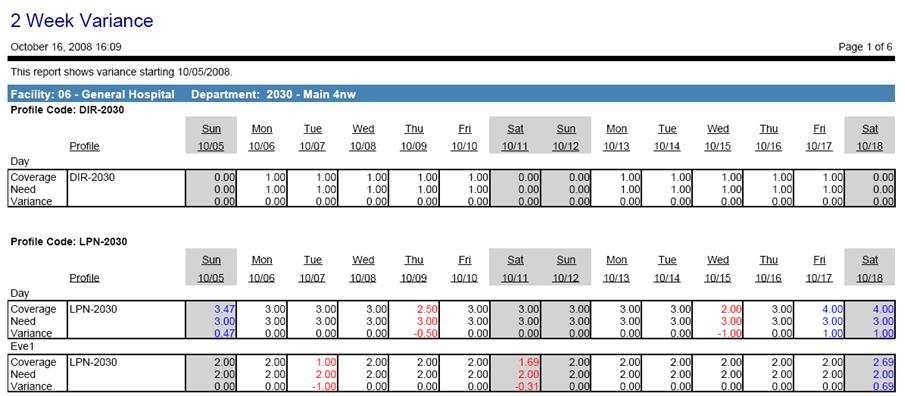
This report shows the variances between the staffing coverage and the staffing needs. When the Show Profile Details parameter is set to Yes, the information is broken down by coverage period. This is the information displayed on the Balancing Grid/Needs Grid in the schedule screen.
Report headers are by organization unit code and name.
Fields can include the profile code and a daily break down of coverage, need, and variance (depending on the options chosen under Advanced Parameters). Positive variances (overstaffing) are displayed in blue and negative variances (understaffing) are displayed in red.
Report parameters include the following options:
-
Organization Unit: Select the organization unit option button to run this report by organization unit. Enter the information in the fields to select the organization units to include in the report.
-
Schedule Group: Select schedule group option button to run this report by schedule group. Select the group from the menu.
-
Start Date: Enter the first day to include in the report. The system calculates the last day to display two weeks.
-
Show Profile Details: Enter Yes to include breakdown by coverage period, or No to display a total for all coverage periods.
Advanced parameters include the following options:
-
Coverage Set: Select the coverage set to be used to break down the information.
-
Show Coverage: Indicate whether to include the staffing coverage value from the schedule (yes/no).
-
Show Need: Indicate whether to include the staffing need value from the schedule (yes/no).
-
Show Variance: Indicate whether to include the variance between the coverage and need values from the schedule (yes/no).
Note
Regarding the Show Coverage, Show Need, and Show Variance parameters:
If one or more of these parameters is set to Yes but there is no data relating to that parameter, you may receive a message on the report alerting you to this situation. For example, if there are only schedules that do not count toward coverage, such as Off or Vacation, and Yes is selected for the coverage parameter, you will receive a message, "There is no coverage currently applied for the (xx) profile"
-
Page Break: Select whether to put page breaks between organization units or profiles.
-
Shade Weekends: Indicate whether to shade the weekend values in gray, to make them easier to identify (yes/no).