7 Day Roster (Letter)
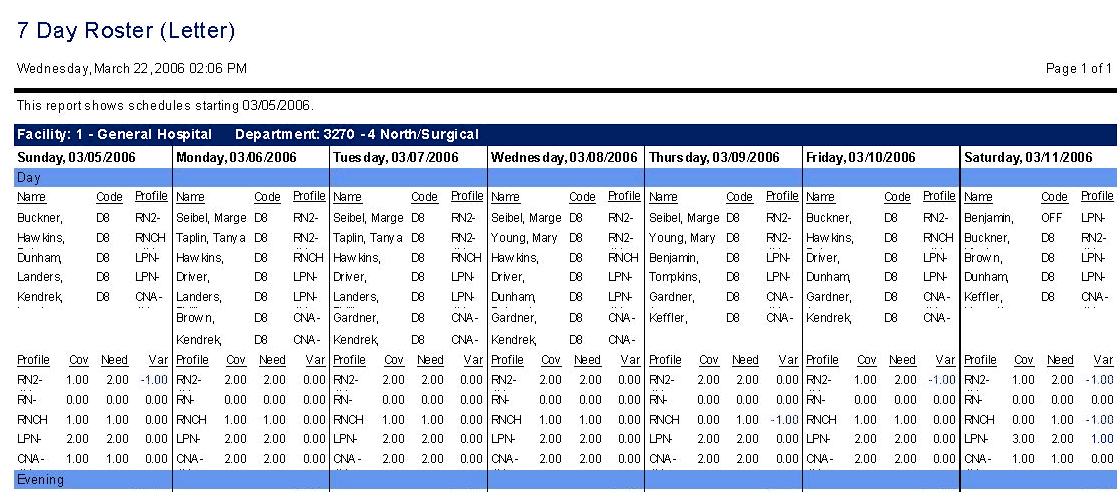
This report lists scheduled employees, for the selected organization unit, by coverage period for each day of a 7-day date range, displayed on letter-sized paper. Report fields include employee name, activity code and profile. Subtotals for each coverage period are provided for coverage, need, and variance for each profile.
Report parameters include the following options:
-
The labor distribution or schedule group to be included in this report.
-
The starting date of the seven-day range.
-
Whether to use the default coverage set, or select an alternate coverage set from the drop down menu.
-
Whether to sort the employees within each coverage period by the Profile Sort value, the Start Time of the activity, the Profile, or Employee name.
-
Whether to allow word-wrapping for long entries.
-
Whether to include non-productive activities (Yes/No).
-
Whether the report should include published activities, pending activities, and/or calendars. Options are: Yes (default), No, or All.
Note
Your choice is affected by how this indicator is set: Activity Code Indicator - SS Solution Standard 5 (Determines how Activity Code is shown in Self Scheduling Grid and Reports).
-
If you select Yes, the activities appear or do not appear as follows:
When the indicator is set to Y, the activities appear.
When the indicator is set to M, the activities are masked, as set by the parameter: SS Application Parameter - SS Solution Standard Alpha 1 (Determines the code shown for masked codes in the self scheduling grid and reports).
When the indicator is set to E or H, the activities do not appear.
-
If you select All, the activities appear regardless of how the indicator is set.
-
If you select No, the activities do not appear on the report.
-